# Introduction
If you are completely new to computer programming, you should definitely start here. This notebook will help you get started with the basics of programming in Python.
## Computer Programming and programming languages
Computer programming is the process of designing and building a **computer program**, which is just a **set of instructions** that a computer will follow to perform a specific task. So, in a way, computer programming is the science of telling a computer what to do. By looking at what computers do nowadays, it is clear that computer programming is quite powerful and has many applications.
Computer programs - the set of instructions mentioned above - are written in a programming language, such as **Python**. Python is one out of many (thousands) of **programming languages** that are available for us to learn. For now, the word that is important in the definition above is **language**, a term that refers to a method of human communication. So, programming languages are fundamentally methods to communicate humans with computers. We know that ultimately, machines speak in digital binary codes (very long sequences of 1's and 0's), known as machine code or **machine language**. Conversely, we know that humans express thoughts in what is known as **natural language**, languages that have evolved naturally throughout human history. Both forms of languages seem a priori radically different, don´t you agree? Luckily for us, computer programming languages are evolving towards natural language, they are becoming more human-friendly, even so that some [computer programs](https://chat.openai.com/) are able to understand commands in natural language. This is a big step from [punched cards](https://en.wikipedia.org/wiki/Punched_card) (pieces of plastic used to write down the first computer programs) or [assembly language](https://en.wikipedia.org/wiki/Assembly_language) (a language with a strong correspondence with the computing processing unit instruction set), and we have to be very thankful for that to the many awesome people who have contributed to this outstanding evolution!
 It follows that modern computer programs like Python are going to be somewhere in between machine language and natural language. In fact, we can regard programming languages as *proxy* languages between (high-level) specifications that describe what we want to implement and the machine language that is finally executed in the computer. In this sense, software engineering is for the most part a *translation* process, a process by which our thoughts are converted into machine language. But, there is another reflection that can be made: If computers are learning to understand human language, why should we bother to learn any other intermediate language to express what we want? Well, if you are still reading this interactive book after this thought, let us first quote Steve Jobs, one of the main drivers of computer science:
> ☝ Everybody in this country should learn how to program a computer... because it teaches you how to think
Indeed, bear in mind that computer programs are specifically design to structure human thoughts so that they can be passed to a machine so that it performs a very specific task. Learning how to program is to a great extent equivalent to learning how to structure our thoughts so that they can be passed and interpreted in an effective way. In this sense, learning a programming language is going to help us structure our thoughts, *engineer* our thoughts into a set of precise instructions. We will find that this transformation process is useful to organise our thoughts even outside the scope of computer programming. Along these lines, did you know that there is a field of linguistics that studies how [language affects the way we think](https://www.nytimes.com/2010/08/29/magazine/29language-t.html)? Research provides evidence that language shapes our thoughts, in the sense that it forces us to specify certain types of information while others can be left to the context, so we need to pay attention to specific aspects of what we want to describe. Learning programming languages definitively shapes the way we think, helping us place the focus in the important functional aspects of the problem we want to solve.
Another relevant argument in favour of learning computer programming is that, well, computers are everywhere! Just as with human communications, even if they are learning our natural languages, it is important for us to understand how they think, and to be able to express what we want in a language that is closer to theirs, because in both cases this is going to make our communication with computers a lot more efficient.
## Fundamental concepts of programming languages
### Syntax and Semantics
Before we dive into the specifics of Python as a programming language, let us use this fundamental definition of a programming language to put the focus of two important aspects of any language:
- **Syntax**: The syntax of a language refers to the way it is structured. Any language contains a set of syntactic rules that determine how words are built from letters, how words are constructed from basic components (e.g. lemmas) and even how sentences are built with different classes of words, or parts of speech. Any programming language will likewise include a set of syntactic rules that will determine how instructions, or statements are built from symbols, and what are the different basic components of any statement.
- **Semantics**: The semantics of a language refer to the meaning of its words and sentences. Just as with natural languages, in a programming language the same symbol can have different meanings depending on the context.
Throughout the book, we may refer to the syntax or the semantics of any aspect of a programming language and for this reason it is important to provide a definition early on.
### Statements, Clauses and Blocks
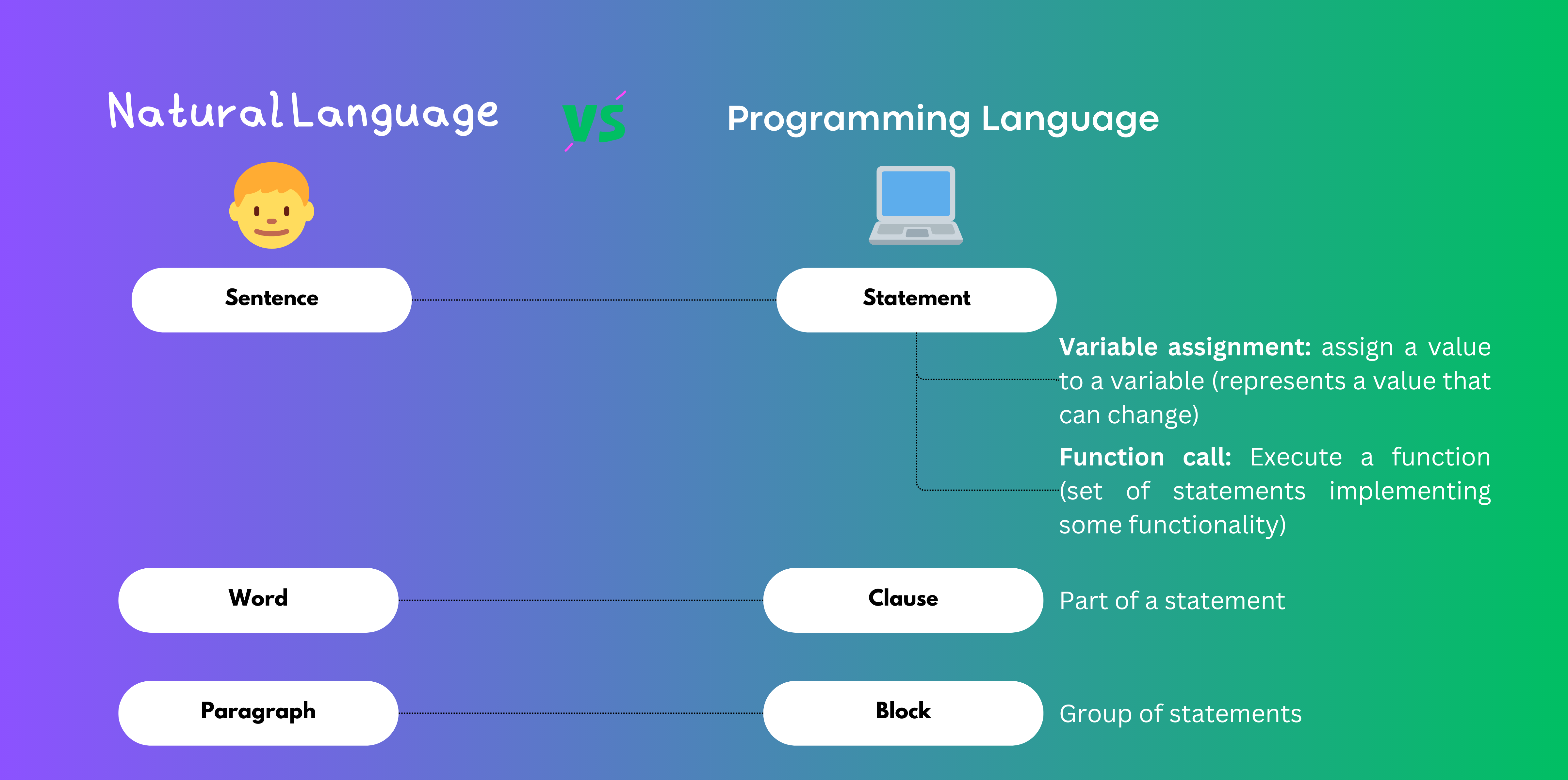
In the context of programming languages, a **statement** is a syntactic unit that expresses a command or an action that the computer should perform. A statement is the equivalent of a **sentence in natural language**. A statement is composed of one or more **clauses**, which are the equivalent of the words in a sentence. A clause is a fragment of a statement with a specific meaning. For example, in the statement `print("Hello World")`, the clause `print` is a command that tells the computer to print something, and the clause `"Hello World"` is the text that we want to print. In this case, the statement is composed of two clauses, but in general, a statement can be composed of any number of clauses.
The equivalent of a natural language paragraph is a **block** of statements. A block is a syntactic unit that groups a set of statements together. Blocks are used to group statements that are related to each other, for example, statements that are executed in a loop, or statements that are executed when a condition is met. We will discuss this concepts in detail in the [Basic Control Structures tutorial](./Basic%20Control%20Structures.ipynb).
### Variables and Expressions
A **variable** is a syntactic unit that represents a value that can change over time. For example, in the statement ```x = 2```, the variable `x` is assigned the value `2`. In this case, the variable is composed of the name `x` and the value `2`. We will refer to these type of statements as **variable assignment statements**.
Expressions are syntactic units that represent a value. For example, in the statement `x = 2 + 3`, the expression `2 + 3` represents the value `5`. In this case, the expression is composed of the values `2` and `3` and the operator `+`.
Now, recall that the value of a variable can change over time, right? So, for example, we can initially assign the value `5` to the variable `x` with the statement ```x = 5```. But, what happens if we execute the statement ```x = x + 3``` after that? Well, the value of `x` will change to `8`, because the expression `x + 3` represents the value `5`. We will discuss these concepts in detail in the [Variables and Expressions tutorial](./Variables.ipynb).
### Functions
A **function** is a syntactic unit that represents a set of statements that are executed together to perform a specific task. A **function call** is a statement that uses a function, for instance ```print("Hello World")```. We will discuss these concepts in detail in the [Built-in Functions tutorial](./Built-in%20Functions.ipynb).
It follows that modern computer programs like Python are going to be somewhere in between machine language and natural language. In fact, we can regard programming languages as *proxy* languages between (high-level) specifications that describe what we want to implement and the machine language that is finally executed in the computer. In this sense, software engineering is for the most part a *translation* process, a process by which our thoughts are converted into machine language. But, there is another reflection that can be made: If computers are learning to understand human language, why should we bother to learn any other intermediate language to express what we want? Well, if you are still reading this interactive book after this thought, let us first quote Steve Jobs, one of the main drivers of computer science:
> ☝ Everybody in this country should learn how to program a computer... because it teaches you how to think
Indeed, bear in mind that computer programs are specifically design to structure human thoughts so that they can be passed to a machine so that it performs a very specific task. Learning how to program is to a great extent equivalent to learning how to structure our thoughts so that they can be passed and interpreted in an effective way. In this sense, learning a programming language is going to help us structure our thoughts, *engineer* our thoughts into a set of precise instructions. We will find that this transformation process is useful to organise our thoughts even outside the scope of computer programming. Along these lines, did you know that there is a field of linguistics that studies how [language affects the way we think](https://www.nytimes.com/2010/08/29/magazine/29language-t.html)? Research provides evidence that language shapes our thoughts, in the sense that it forces us to specify certain types of information while others can be left to the context, so we need to pay attention to specific aspects of what we want to describe. Learning programming languages definitively shapes the way we think, helping us place the focus in the important functional aspects of the problem we want to solve.
Another relevant argument in favour of learning computer programming is that, well, computers are everywhere! Just as with human communications, even if they are learning our natural languages, it is important for us to understand how they think, and to be able to express what we want in a language that is closer to theirs, because in both cases this is going to make our communication with computers a lot more efficient.
## Fundamental concepts of programming languages
### Syntax and Semantics
Before we dive into the specifics of Python as a programming language, let us use this fundamental definition of a programming language to put the focus of two important aspects of any language:
- **Syntax**: The syntax of a language refers to the way it is structured. Any language contains a set of syntactic rules that determine how words are built from letters, how words are constructed from basic components (e.g. lemmas) and even how sentences are built with different classes of words, or parts of speech. Any programming language will likewise include a set of syntactic rules that will determine how instructions, or statements are built from symbols, and what are the different basic components of any statement.
- **Semantics**: The semantics of a language refer to the meaning of its words and sentences. Just as with natural languages, in a programming language the same symbol can have different meanings depending on the context.
Throughout the book, we may refer to the syntax or the semantics of any aspect of a programming language and for this reason it is important to provide a definition early on.
### Statements, Clauses and Blocks
In the context of programming languages, a **statement** is a syntactic unit that expresses a command or an action that the computer should perform. A statement is the equivalent of a **sentence in natural language**. A statement is composed of one or more **clauses**, which are the equivalent of the words in a sentence. A clause is a fragment of a statement with a specific meaning. For example, in the statement `print("Hello World")`, the clause `print` is a command that tells the computer to print something, and the clause `"Hello World"` is the text that we want to print. In this case, the statement is composed of two clauses, but in general, a statement can be composed of any number of clauses.
The equivalent of a natural language paragraph is a **block** of statements. A block is a syntactic unit that groups a set of statements together. Blocks are used to group statements that are related to each other, for example, statements that are executed in a loop, or statements that are executed when a condition is met. We will discuss this concepts in detail in the [Basic Control Structures tutorial](./Basic%20Control%20Structures.ipynb).
### Variables and Expressions
A **variable** is a syntactic unit that represents a value that can change over time. For example, in the statement ```x = 2```, the variable `x` is assigned the value `2`. In this case, the variable is composed of the name `x` and the value `2`. We will refer to these type of statements as **variable assignment statements**.
Expressions are syntactic units that represent a value. For example, in the statement `x = 2 + 3`, the expression `2 + 3` represents the value `5`. In this case, the expression is composed of the values `2` and `3` and the operator `+`.
Now, recall that the value of a variable can change over time, right? So, for example, we can initially assign the value `5` to the variable `x` with the statement ```x = 5```. But, what happens if we execute the statement ```x = x + 3``` after that? Well, the value of `x` will change to `8`, because the expression `x + 3` represents the value `5`. We will discuss these concepts in detail in the [Variables and Expressions tutorial](./Variables.ipynb).
### Functions
A **function** is a syntactic unit that represents a set of statements that are executed together to perform a specific task. A **function call** is a statement that uses a function, for instance ```print("Hello World")```. We will discuss these concepts in detail in the [Built-in Functions tutorial](./Built-in%20Functions.ipynb).
 ### Basic structure of a program
Ok, so now that we have a basic understanding of the fundamental concepts of programming languages, let us discuss the basic structure of a program. A program is a set of statements that are executed sequentially. In other words, a program is a set of statements that are executed one after the other. For example, the following program is composed of three statements:
:::{admonition} Basic structure of a program
:class: hint
name = input("What is your name?")
print("Hello!")
print("Nice to meet you " + name)
:::
The first statement asks the user to input a text, and assigns the value of the input to the variable `name`. The second statement prints the text `Hello!` in the screen. The third statement prints the text `Nice to meet you` followed by the value of the variable `name`. The output of this program would be something like this:
```shell
>>>What is your name? John
Hello!
Nice to meet you John
```
Note that the basic structure of the program is:
- **Input:** Ask the user to provide some input. In this example, we ask the user to provide a name and assign the value of the input to the variable `name`.
- **Process:** Process the input of the user and implement the functionality of our program. In this basic example, we just Print the text `Hello!` in the screen.
- **Output:** Return some values back to the user. In the example, we just print the text `Nice to meet you` followed by the value of the variable `name`.
## Extra
### Python as a programming language
As mentioned above, there are many, many, many different programming languages, so why have we chosen Python as the first programming language for engineering and management? Well, one of the reasons is that at the time of writing, it is a very relevant programming language. Github - a collaborative programming platform that we will discuss extensively further down this book - publishes every year a report with some statistics on the use of programming languages called [The state of the octaverse](https://octoverse.github.com/#top-languages-over-the-years). At the time of writing, Python is the second most popular programming language in the world:

Other popular programming languages are Java, JavaScript, or C#, as shown in the list. Since it is the second best, popularity alone is not a very compelling argument. It is not even the main reason why we chose it for you to learn computer programming. The main reason why we chose Python is because it is very **didactic**, very adequate to each computer programming, because its syntactic rules make the code very easy to read by humans. Related to this, other important characteristic is that Python is both a [scripting language](https://en.wikipedia.org/wiki/Scripting_language) and an object-oriented programming language.
Scripting languages are languages specifically designed to automate tasks by executing a sequence of commands, just like you would cook a delicious dish using a recip. These sequencing makes scripting languages more intuitive and adequate as a first stop in the journey. As opposed to scripting programming, in [concurrent programming](https://en.wikipedia.org/wiki/Concurrent_computing), the lifetime of commands or computations may overlap in time. Obviously, this may be beneficial, but sequencing is a priori simpler, more intuitive and better suited for the first approximation to programming.
Python is also an [object-oriented programming language](https://en.wikipedia.org/wiki/Object-oriented_programming). Object Oriented Programming (OOP) is a programming paradigm based on the definition of structures that mimic real world objects, therefore rendering the code easier to understand by humans, dialing it one notch closer to natural language.
Python, as many other scripting language, is an interpreted language, as opposed to compiled languages. The Python interpreter *interprets* the statements in your source code and converts it to instructions to the running program on the fly. Compilation on the other hand consists on building the entire sequence of instructions to run the code and saving it in an object that is later passed to execution. Compiled languages are in general **faster** because the compilation process is very efficient in generating objects, but interpreted languages are better for experimenting with codes (which is the main objective of the code) because it saves you the compilation step and also allows you to use the interpreter interactively.
With this brief overview of the characteristics of Python, we have covered some of the main concepts and classifications of programming languages. Next section covers how Python works in more detail.
### How does Python work
This section describes what happens briefly what happens when you want to execute the code that you just developed in Python.
As mentioned above, Python is an interpreted language, so it should be no surprise that the Python **interpreter** comes into play when you want to execute a Python script.
When you install Python in a system, you are basically installing the interpreter, and if you want to run a script, you basically need to call the interpreter passing the name of the script as an argument. For instance, if you use a terminal, it will look something like this:
:::{admonition} Executing Python in a shell
:class: hint
python my_script.py
:::
where ```my_script.py``` is the name of the file containing your program code in your file system (located in the same folder where you opened the terminal).

As shown in the diagram, when you run your program, the interpreter processes the script and generates another file (my_script.pyc) that is later passed to the internal Python virtual machine. The virtual machine provides a level of abstraction between your program and the operating system, which could be for instance Windows, or Linux, and interprets the (*.pyc) to pass instructions in machine language for the operating system. The c in the *.pyc file stands for *compiled*, and in this sense, one could say that Python implements both a compiler and an interpreter, although it is primarily considered an interpreted programming language.
The reference implementation of Python is [CPython](https://github.com/python/cpython)
As mentioned above, the fact that the code is interpreted in this way impacts performance, but it is very convenient to experiment with code (this is the main reason why this book is written in Python). Since it is so good for experimentation, there is a huge Python community, particularly in fields related to data science and engineering, and there is a huge interest in overcoming this drawback and make Python a lot faster and efficient.
For instance, CPython
### Programming paradigms
Just as there are many different narrative styles to tell a story using natural language, there are many different ways to write the same program, and of course, many different ways to do it with style. In fact, contrary to common believe, programming is a quite creative activity. Soon enough, you will find yourself admiring your latest creation, bragging about your code with other fellow programmers. But to get your own style, you should get familiar with the different **programming paradigms**, different styles, strategies, or approaches applied to solve a problem using some programming language. Traditionally, computer sciences establishes two main programming paradigms:
- **Imperative:** Defines a series of steps to go through to solve the problem, like a recipe, as described above. As mentioned above, scripting languages are to a great extent related to imperative programming. Imperative programming are:
- **Structured**, in the sense that the control flow is defined by control structures (nested loops, conditionals, and subroutines). In future Notebooks, we will define the structure theorem and explain in detail what these control structures are.
- **Procedural**, in the sense that they allow grouping instructions into reusable structures called procedures, so that they you do not need to write down the same pieces of code over and over again. We will describe this property in detail when we discuss modular programming.
- **Object-oriented**, as discussed in the previous section, object-oriented programming allows to group data and functionality into objects, which are just programming structures that mimic real world objects.
- **Declarative:** Declares properties of the desired result, but not how to compute it. In declarative programming, developers rely on features of the programming language that provide a higher level of abstraction, so that the developer does not need to worry on how functionality is implemented, just use it. Declarative languages are:
- **Functional:** Control flow is expressed by combining function calls, rather than by assigning values to variables.
- **Data flow oriented**: The program is modeled as a sequence of operations performed in data to achieve the desired output.
Although it is not the main objective, this book also covers another programming language, Markdown, which is declarative. Markdown is the programming language used to generate the contents of this webpage, and as you will learn, you do not need to worry how the browser is actually going to render the text or apply styles to specific parts of the document, like titles, you just need to worry about writing interesting stuff and tell Markdown what pieces of text are titles, which words should be rendered in bold, etc.
Also, some advanced libraries (think of libraries as extensions of the native features of Python) that we are going to use in this book will somewhat make our code oriented towards the declarative paradigm. The best thing is that most modern programming languages like Python are **multiparadigmatic**. This means that, although some programming languages make it easy to write programs following some paradigm, they cannot be strictly classified into one paradigm, but rather include features from several paradigms.
Other important programming paradigms that we will address in the course are:
- **Event-driven:** The flow of the program is determined by events such as user actions (mouse clicks, key presses), sensor outputs, or messages from other programs. This paradigm is primarily used to build user interfaces. For instance, Node-red (JavaScript) and Airflow (Python) are a popular event-driven development environments quite suitable for data processing projects.
- **Array oriented:** Apply operations at once to a set of values stored in array data structures (multidimensional collections of numbers like vectors and matrices). Array oriented programming is widely used in scientific and engineering applications. We will cover array oriented programming in detail
### Basic structure of a program
Ok, so now that we have a basic understanding of the fundamental concepts of programming languages, let us discuss the basic structure of a program. A program is a set of statements that are executed sequentially. In other words, a program is a set of statements that are executed one after the other. For example, the following program is composed of three statements:
:::{admonition} Basic structure of a program
:class: hint
name = input("What is your name?")
print("Hello!")
print("Nice to meet you " + name)
:::
The first statement asks the user to input a text, and assigns the value of the input to the variable `name`. The second statement prints the text `Hello!` in the screen. The third statement prints the text `Nice to meet you` followed by the value of the variable `name`. The output of this program would be something like this:
```shell
>>>What is your name? John
Hello!
Nice to meet you John
```
Note that the basic structure of the program is:
- **Input:** Ask the user to provide some input. In this example, we ask the user to provide a name and assign the value of the input to the variable `name`.
- **Process:** Process the input of the user and implement the functionality of our program. In this basic example, we just Print the text `Hello!` in the screen.
- **Output:** Return some values back to the user. In the example, we just print the text `Nice to meet you` followed by the value of the variable `name`.
## Extra
### Python as a programming language
As mentioned above, there are many, many, many different programming languages, so why have we chosen Python as the first programming language for engineering and management? Well, one of the reasons is that at the time of writing, it is a very relevant programming language. Github - a collaborative programming platform that we will discuss extensively further down this book - publishes every year a report with some statistics on the use of programming languages called [The state of the octaverse](https://octoverse.github.com/#top-languages-over-the-years). At the time of writing, Python is the second most popular programming language in the world:

Other popular programming languages are Java, JavaScript, or C#, as shown in the list. Since it is the second best, popularity alone is not a very compelling argument. It is not even the main reason why we chose it for you to learn computer programming. The main reason why we chose Python is because it is very **didactic**, very adequate to each computer programming, because its syntactic rules make the code very easy to read by humans. Related to this, other important characteristic is that Python is both a [scripting language](https://en.wikipedia.org/wiki/Scripting_language) and an object-oriented programming language.
Scripting languages are languages specifically designed to automate tasks by executing a sequence of commands, just like you would cook a delicious dish using a recip. These sequencing makes scripting languages more intuitive and adequate as a first stop in the journey. As opposed to scripting programming, in [concurrent programming](https://en.wikipedia.org/wiki/Concurrent_computing), the lifetime of commands or computations may overlap in time. Obviously, this may be beneficial, but sequencing is a priori simpler, more intuitive and better suited for the first approximation to programming.
Python is also an [object-oriented programming language](https://en.wikipedia.org/wiki/Object-oriented_programming). Object Oriented Programming (OOP) is a programming paradigm based on the definition of structures that mimic real world objects, therefore rendering the code easier to understand by humans, dialing it one notch closer to natural language.
Python, as many other scripting language, is an interpreted language, as opposed to compiled languages. The Python interpreter *interprets* the statements in your source code and converts it to instructions to the running program on the fly. Compilation on the other hand consists on building the entire sequence of instructions to run the code and saving it in an object that is later passed to execution. Compiled languages are in general **faster** because the compilation process is very efficient in generating objects, but interpreted languages are better for experimenting with codes (which is the main objective of the code) because it saves you the compilation step and also allows you to use the interpreter interactively.
With this brief overview of the characteristics of Python, we have covered some of the main concepts and classifications of programming languages. Next section covers how Python works in more detail.
### How does Python work
This section describes what happens briefly what happens when you want to execute the code that you just developed in Python.
As mentioned above, Python is an interpreted language, so it should be no surprise that the Python **interpreter** comes into play when you want to execute a Python script.
When you install Python in a system, you are basically installing the interpreter, and if you want to run a script, you basically need to call the interpreter passing the name of the script as an argument. For instance, if you use a terminal, it will look something like this:
:::{admonition} Executing Python in a shell
:class: hint
python my_script.py
:::
where ```my_script.py``` is the name of the file containing your program code in your file system (located in the same folder where you opened the terminal).

As shown in the diagram, when you run your program, the interpreter processes the script and generates another file (my_script.pyc) that is later passed to the internal Python virtual machine. The virtual machine provides a level of abstraction between your program and the operating system, which could be for instance Windows, or Linux, and interprets the (*.pyc) to pass instructions in machine language for the operating system. The c in the *.pyc file stands for *compiled*, and in this sense, one could say that Python implements both a compiler and an interpreter, although it is primarily considered an interpreted programming language.
The reference implementation of Python is [CPython](https://github.com/python/cpython)
As mentioned above, the fact that the code is interpreted in this way impacts performance, but it is very convenient to experiment with code (this is the main reason why this book is written in Python). Since it is so good for experimentation, there is a huge Python community, particularly in fields related to data science and engineering, and there is a huge interest in overcoming this drawback and make Python a lot faster and efficient.
For instance, CPython
### Programming paradigms
Just as there are many different narrative styles to tell a story using natural language, there are many different ways to write the same program, and of course, many different ways to do it with style. In fact, contrary to common believe, programming is a quite creative activity. Soon enough, you will find yourself admiring your latest creation, bragging about your code with other fellow programmers. But to get your own style, you should get familiar with the different **programming paradigms**, different styles, strategies, or approaches applied to solve a problem using some programming language. Traditionally, computer sciences establishes two main programming paradigms:
- **Imperative:** Defines a series of steps to go through to solve the problem, like a recipe, as described above. As mentioned above, scripting languages are to a great extent related to imperative programming. Imperative programming are:
- **Structured**, in the sense that the control flow is defined by control structures (nested loops, conditionals, and subroutines). In future Notebooks, we will define the structure theorem and explain in detail what these control structures are.
- **Procedural**, in the sense that they allow grouping instructions into reusable structures called procedures, so that they you do not need to write down the same pieces of code over and over again. We will describe this property in detail when we discuss modular programming.
- **Object-oriented**, as discussed in the previous section, object-oriented programming allows to group data and functionality into objects, which are just programming structures that mimic real world objects.
- **Declarative:** Declares properties of the desired result, but not how to compute it. In declarative programming, developers rely on features of the programming language that provide a higher level of abstraction, so that the developer does not need to worry on how functionality is implemented, just use it. Declarative languages are:
- **Functional:** Control flow is expressed by combining function calls, rather than by assigning values to variables.
- **Data flow oriented**: The program is modeled as a sequence of operations performed in data to achieve the desired output.
Although it is not the main objective, this book also covers another programming language, Markdown, which is declarative. Markdown is the programming language used to generate the contents of this webpage, and as you will learn, you do not need to worry how the browser is actually going to render the text or apply styles to specific parts of the document, like titles, you just need to worry about writing interesting stuff and tell Markdown what pieces of text are titles, which words should be rendered in bold, etc.
Also, some advanced libraries (think of libraries as extensions of the native features of Python) that we are going to use in this book will somewhat make our code oriented towards the declarative paradigm. The best thing is that most modern programming languages like Python are **multiparadigmatic**. This means that, although some programming languages make it easy to write programs following some paradigm, they cannot be strictly classified into one paradigm, but rather include features from several paradigms.
Other important programming paradigms that we will address in the course are:
- **Event-driven:** The flow of the program is determined by events such as user actions (mouse clicks, key presses), sensor outputs, or messages from other programs. This paradigm is primarily used to build user interfaces. For instance, Node-red (JavaScript) and Airflow (Python) are a popular event-driven development environments quite suitable for data processing projects.
- **Array oriented:** Apply operations at once to a set of values stored in array data structures (multidimensional collections of numbers like vectors and matrices). Array oriented programming is widely used in scientific and engineering applications. We will cover array oriented programming in detail